 Re:Cast
Kingdom Hearts Re:Cast

Available now
Available on Windows, Mac, Linux and Android.
A lost piece of Kingdom Hearts history: the 2005 Verizon V CAST game, playable with full sound for the first time. One download, nothing else to install.
Free and open source
About
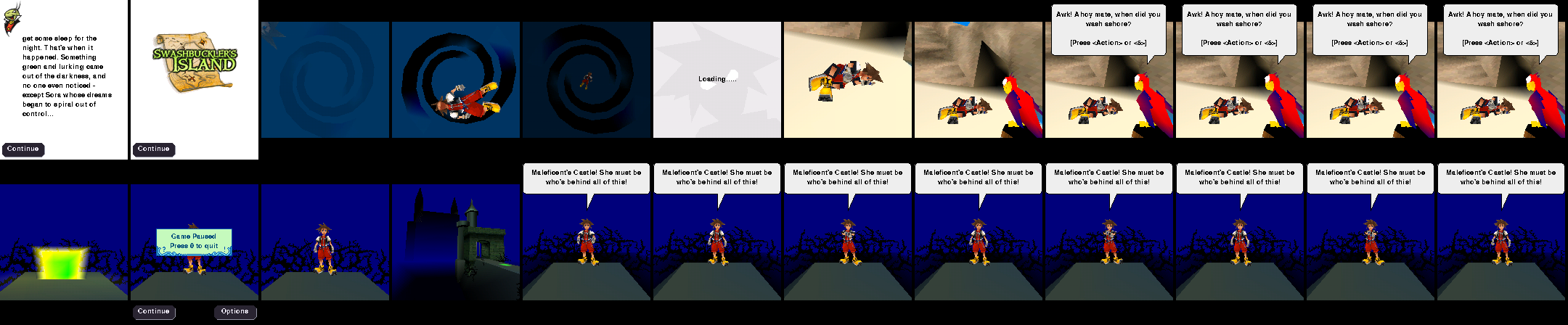
In 2005, Superscape and Disney Mobile made a full 3D Kingdom Hearts for Verizon's V CAST phones: Sora, the Keyblade, Maleficent's Castle, all on a phone with a 176×220 screen. The phones, the service and the store are long gone.
Re:Cast runs the game's own code, unchanged, on an emulated phone processor and recreates the phone features it relies on. It draws the real 3D, plays the music and sound effects, and carries you from world to world through the game's own chapter flow.
Playable with full sound for the first time, on PC and now on Android.
Until now this game ran only on its original phones, on a collector's modified Zeebo console, or without any audio in an Android emulator. As far as we know, Re:Cast is the first emulator to play it with its music and sound effects in context: the game's real soundtrack and effects, in step with the action.
Features
Authentic
The game's own code
Re:Cast runs the real game program and Superscape's 3D engine, unchanged, on an emulated phone processor. It is the game itself, not a remake.
The original music and sound
The real soundtrack and sound effects, in step with the action, including the phone's compressed voice-codec effects, decoded properly. A first on PC.
Its own saves and scores
Load Game, the save points and the “post your score” screen all behave the way they did on the phone.
Play all 3 found chapters
The training area and Swashbuckler's Island, Agrabah and Maleficent's Castle, played through start to finish.
Quality of life
Save states
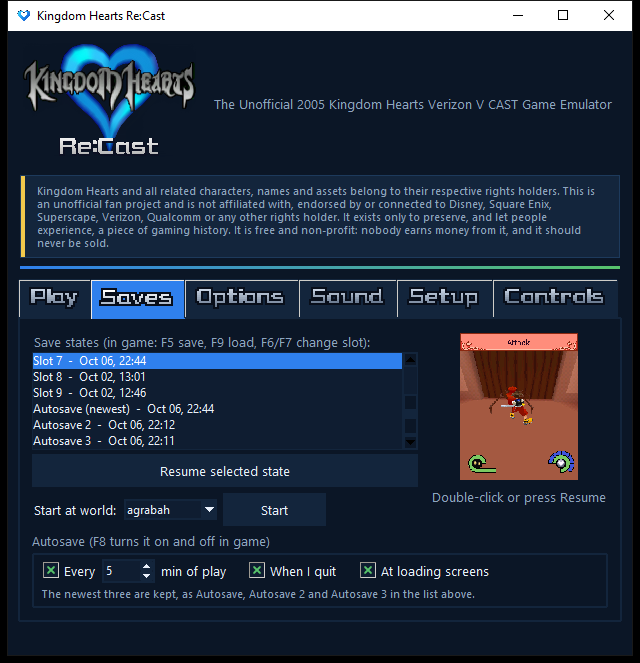
Snapshot anywhere with F5 and load with F9: nine slots, automatic autosaves, and backups of the game's own saves.
A launcher that remembers
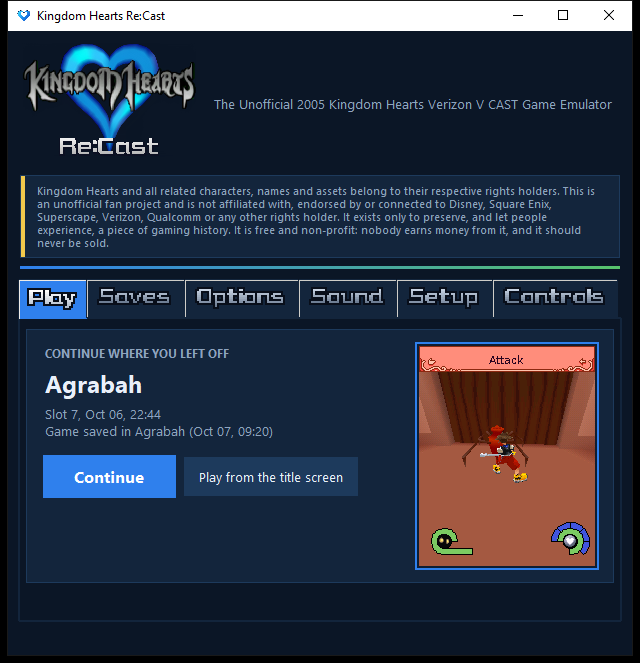
A Continue button with a preview of where you left off, one-click setup, and your settings kept.
Picture filters
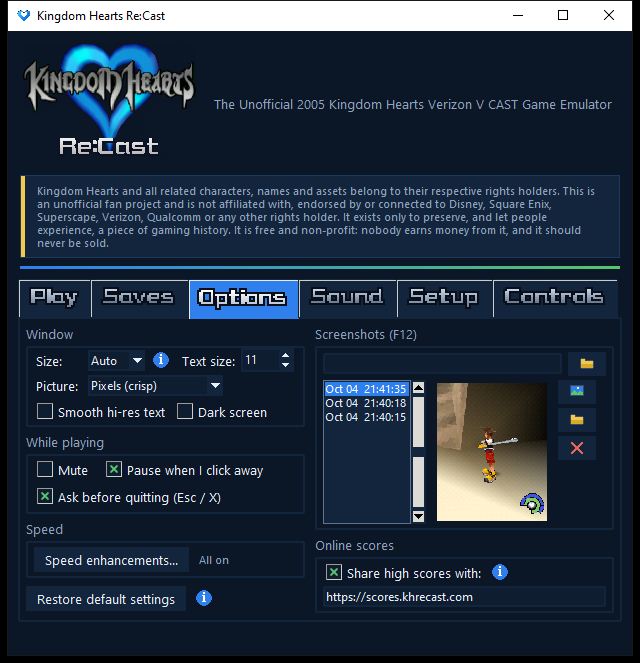
Crisp pixels, smooth, sharp pixels or Scale2x. Press F11 to compare them live.
Smooth hi-res text
The game's tiny 176×220 text is redrawn sharply at your window's resolution, so menus and dialogue stay crisp at any size.
A shared leaderboard
The original ranking server is long gone, so Re:Cast brings it back. Scores are shared anonymously (only the world, score, Munny, EXP, Level and time, plus the kind of device and the Re:Cast version, never who you are) so you can see how you rank. You can switch sharing off. A run that used a save state, or that doesn't beat a score you already shared, is not shared.
Faster 3D, same picture
Speed-ups for the game's 3D engine, checked pixel for pixel against the original. On by default; each one can be switched off in the Options tab, with an info bubble explaining what it does.
Set your own keys
Move, action, magic, status, the two softkeys and Backspace can each be changed to whatever you like on the launcher's Controls tab. A key already in use tells you so.
Everything included
One installer for Windows, Mac or Linux, with its own Python, ffmpeg and game files. No setup, no extra downloads.
Screenshots


The launcher
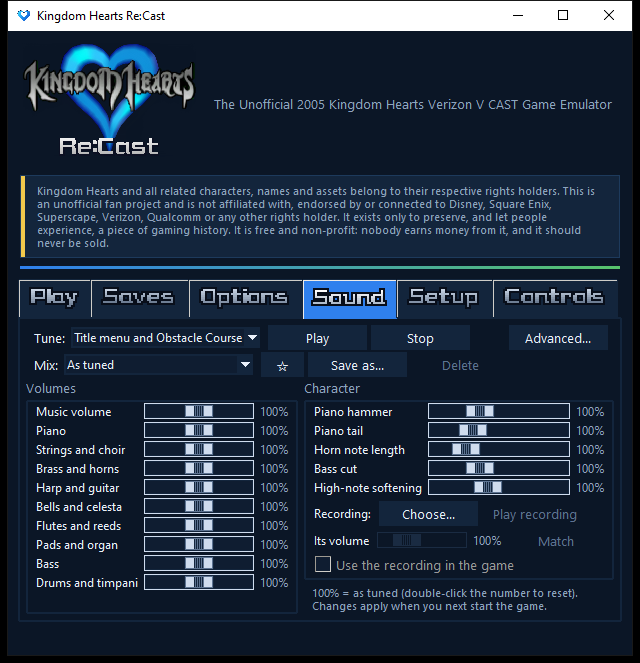
Re:Cast opens with a launcher that picks up where you left off, keeps your save states, and lets you set up the picture and the music before you play. It finds the game files itself the first time.
The music
The game’s music was written by composer Ian Livingstone in 2004, for a game they never played. Years later the YouTuber 13th Vessel got in touch with them, and posted the complete original soundtrack: “KINGDOM HEARTS V-Cast [Complete Original Soundtrack]”.
The video’s description holds an interview with the composer, in which they answer questions about the music. It is an interesting read if you like this soundtrack.
Download the soundtrack
The game’s music is available as audio files from KHInsider: Kingdom Hearts V CAST (Mobile) (gamerip) (2005).
If you prefer those recordings to Re:Cast’s built-in synthesizer, the game can play them instead, tune by tune. In the launcher’s Sound tab, pick the tune, Choose... the matching file, press Match to even out the volume, then tick Use the recording in the game. Re:Cast fits each recording to the game’s own length for that tune, so the game plays exactly as before; untick it to go back to the built-in music.
The Sound tab also has sliders and ready-made mixes for the built-in synth, and an Advanced... window to play every tune through a General MIDI SoundFont instead, with the free fluidsynth program (not included). The built-in synth renders each tune once and keeps it so it plays instantly after that; Clear cached music in that same window gives the space back if you want it.
Help
Can't find your answer here? Email khrecast@gmail.com or leave an entry in Jiminy's Journal. Installing, or checking that a download is genuine? See the download page.
Where are my saves?
In a folder called .khvcemu in your home folder, kept safe across updates and uninstalls. Save states also appear in the launcher with a preview picture.
Controls
These are the keys as they come. W, A, S, D, Space (the action key), F, Z, Q, E and Backspace (back: once pauses, twice goes to the title screen) can be changed on the launcher's Controls tab.
| Keys | In the game |
|---|---|
| WASD / arrows / NumPad | Move (up is forward) |
| Enter / Space / 5 | Action, attack (also select and jump) |
| F / [ / * | Magic (the * is on the number pad) |
| Z / 0 | Status + items |
| Q / F1 | Pause, Continue (the left softkey) |
| E / F2 | Back, Options (the right softkey) |
| Keys | Re:Cast |
| F5 / F9 | Save / load a save state |
| F6 / F7 | Change slot (Shift+1 to 9 picks one, Shift+0 the autosave) |
| F8 | Autosave on / off (the kinds chosen on the launcher's Saves tab) |
| F10 / F12 | Mute / screenshot |
| Esc | Quit (it asks first) |
| F11 | Picture filter |
It runs slowly on my computer
Re:Cast is emulating a whole phone, and the 3D engine is demanding. On the PC it was built on, the game runs at about 25 frames per second in most scenes and about 19 in the busiest (a fight, Agrabah's lava cave). Slower machines show fewer frames rather than slowing the game down. The speed enhancements and the steady frame rate (launcher, Options) are on by default.
Screenshots, and freeing up space
F12 takes a screenshot (a small message confirms where it was saved). The launcher's Options tab lists them with a preview of the one you've selected: icons let you choose the folder, open the selected picture, open the folder, or delete it. On Windows a deleted screenshot goes to the Recycle Bin, after a question you can turn off and bring back with Restore default settings.
The built-in music synth renders each tune once and keeps it so it plays at once next time; it takes a few MB. The Sound tab's Advanced... window has Clear cached music if you want that space back (the game renders the tunes again when it needs them).
Credits
Thank you
Re:Cast only exists because of people who found, dumped, restored, recorded and wrote about this game, often years before the emulator. These are the people and projects behind it. Re:Cast is not affiliated with any of them. If you are listed below and would like information modified or removed, please send an email.
Recovering the game
The music
Ian Livingstone
Composed the music and sound (credited as “MTS – Mediathemes & Sound”).
13th Vessel
Posted the complete original soundtrack and made the game's 3D models viewable.
Aid1043
Made the 2025 “Authentic Restoration” soundtrack and shared it on KHInsider. Their Wonderland track is the theme that plays on the Wonderland screen.
Playing and recording it
Pablo González (@Caith_Sith)
Showed the lost Wonderland chapter on video, August 2026: a 16-second clip and a 24-minute recording. The clip and the pictures on the Find Wonderland page are his.
Fonts
Televo
Recreated the Kingdom Hearts menu font (KHMenu) for the free “Kingdom Hearts Re:Collection” set. The Re:Cast title, the launcher’s tab names, the Android app’s menu names and this site’s Main Menu, Leaderboard and Download are drawn in it (modified to a lower resolution).
The Caveat Project Authors
Made Caveat, the handwriting on this site’s Jiminy’s Journal note (SIL Open Font License).
Cyreal
Made Alice, a storybook font inspired by Lewis Carroll’s books, used for Find Wonderland in this site’s menu (SIL Open Font License).
Emulation and research
zeebulator
An open-source (GPL-3.0) Zeebo/BREW emulator by requeijaum and contributors. Re:Cast's BREW interface research builds on it.
Melange
A BREW emulator for Android by UsernameAK that can run the game without audio.
Also: the editors of the Lost Media Wiki, KHwiki and Kingdom Hearts Database, KH13, KHInsider and its forum, and the Internet Archive, who documented this game's history. If you are listed and want a link changed or removed, email us.